
Every link you share is a small door. If the address is public, anyone who sees it can walk through, including people you never meant to invite and automated programs that collect links around the clock. A protected link is a simple way of putting a gatekeeper in front of that door.
The basic idea
A protected link is a new web address that points to a short checking page instead of pointing straight at your destination. When someone opens it, they first see that page. Only after passing the check, and entering a password if you set one, are they sent on to the original address. The original link is not printed in the message you shared, so it is not sitting in plain sight for anyone to copy.
What happens step by step
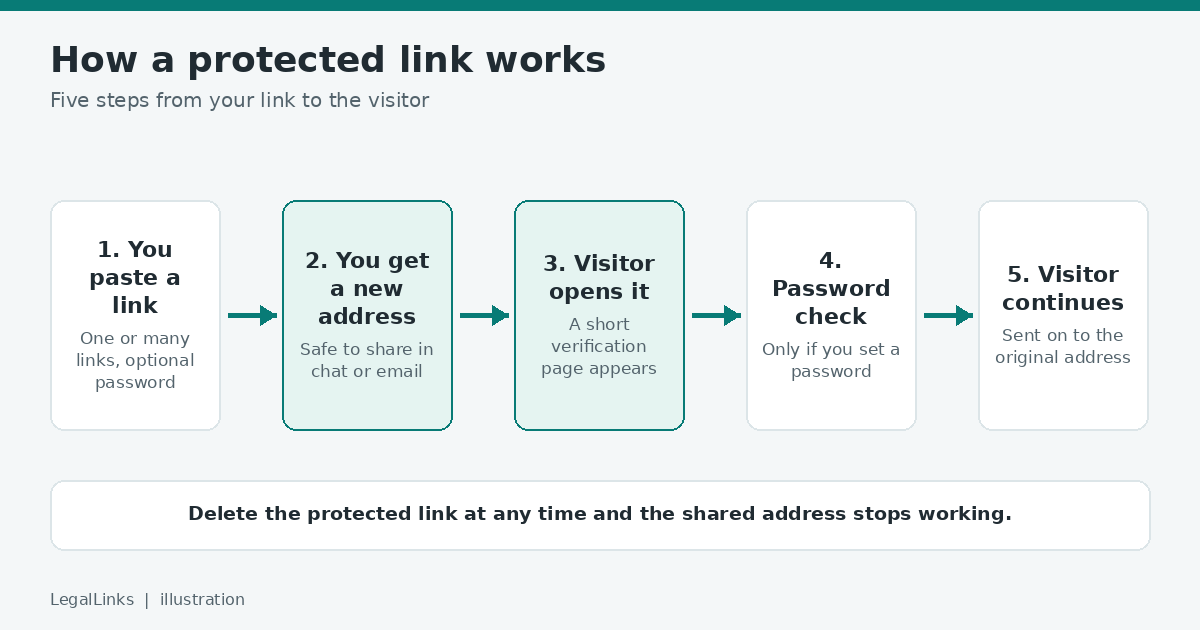
- You paste a link. On a service such as LegalLinks you paste one link, or many links at once, and choose whether to add a password.
- You receive a protected address. It is short, safe to paste into a chat, an email or a document, and it is separate from the original.
- A visitor opens the protected address. They see a verification page. Real people pass it quickly; many simple automated tools do not.
- The password is checked. If you added one, the visitor must type it correctly. A good service stores only a scrambled version of the password, never the password itself.
- The visitor reaches the destination. They are sent to the original address.
What a protected link is good for
- Keeping a link away from basic scrapers that harvest addresses from public pages.
- Sharing something with a limited group, such as a class, a client or a small community.
- Having one place that lists every link you shared and how often each was opened.
- Removing access later: when you delete a protected link, that address stops working even if people still have it.
What it cannot do
It is important to be honest about limits. A protected link does not make the destination itself secret. If someone already knows the original address, they can still open it directly. It also cannot stop a person you trusted from forwarding the password or the link. Treat protection as an extra layer, not as a guarantee. For truly sensitive files, use the access controls of the place where the file is stored as well.
A worked example
Suppose a tutor keeps weekly worksheets in a shared folder and wants only her enrolled students to open them. If she pastes the folder address into a group chat, every member can see it, forward it and copy it, and any tool that reads the chat export can collect it too. If she creates a protected link with a password and sends the password in a separate message at the start of the course, a passer-by who finds the link still meets a checking page and a password box. When the term ends she deletes the protected link, and the old address stops working even though the folder itself has not changed.
What the visitor sees
The verification page is deliberately simple. It shows the title of the link if you gave one, a short check, and a password field only when you set a password. Visitors do not need an account. Because the page looks the same for everyone, you can describe it in a sentence when you share the link, for example: “You will see a short check first, then the page opens.” That also reassures people that your message is genuine and not a trick.
Questions beginners often ask
Do my visitors need to sign up? No. Only the person who creates and manages links needs an account.
Can I protect many links at once? Yes. You can paste several links, one per line, or upload a text file. Each one receives its own protected address.
Can I see how many people opened a link? Yes. The dashboard lists each link together with its number of unique visits, so you can tell whether people actually used it.
What if I forget the password? A good service stores only a scrambled version of it, so it cannot be read back. Create a new protected link with a new password and delete the old one. That is quicker than recovery and it keeps the old access closed.
How to decide whether you need one
Ask what would go wrong if a stranger opened the link. If the answer is “nothing”, a normal link is fine. If the answer is “someone could copy my material, overload my page with automated visits, or see something meant for a small group”, a protected link is worth the extra minute. The more people you share with, and the longer the link will stay in circulation, the more useful the extra layer becomes.
Mistakes to avoid
- Putting the password in the same message as the link.
- Using a protected link as the only protection for sensitive files.
- Forgetting to delete links after a project or course has ended.
- Sharing the original address somewhere else and then wondering why the protection did not help.
Protected link, short link and direct link
A direct link is the original address. A short link only makes an address shorter. A protected link adds a check, and optionally a password, before the visitor continues. You can read more about the difference in our guide on link shorteners and protected links.
Is it legal to use?
Protecting a link is a normal technical measure. What matters is the content you point to. You should only protect links to material that you have the right to share and that is lawful. Our Terms of Use explain what is not allowed.
Quick checklist before you protect a link
- Do you have the right to share what the link points to?
- Is a password useful here, and have you chosen a strong one?
- Will you share the password through a different channel than the link?
- Do you know how to delete the link later if plans change?
With these questions answered, a protected link is a quick, low-effort way to share more carefully.