
Adding a password to a link is one of the easiest ways to limit who can open it. But a weak password, or one shared in the wrong way, gives a false feeling of safety. These ideas will help you do it properly.
Why length beats complexity
Guessing programs try millions of combinations. Every extra character multiplies the work they must do. A long phrase is therefore usually stronger than a short password stuffed with symbols. “Tr0ub4dor&3” looks clever, but it is short and follows common patterns.
Use a passphrase
Choose four or five unrelated words and join them, for example lantern-maple-orbit-seven. It is easy for you to type and to dictate over the phone, yet hard for a stranger to guess. Do not use famous quotes, song lyrics or lines from books.
What to avoid
- Names of people, pets, teams or places connected to you.
- Birthdays, phone numbers and simple number runs such as 123456.
- The word “password” or small changes to it.
- The same password you use for email, banking or social media.
Use a different password for each important link
If one password is shared with many groups, then any member of any group can open everything. Using separate passwords means that a leak affects only one link, and you can delete just that link.
Share the password separately
Do not put the link and the password in the same message. If someone intercepts that single message they get both. Send the link by email and the password by a messaging app, or tell it aloud. For repeated groups, agree on the password once in person.
Change it when people leave
When someone no longer needs access, create a new protected link with a new password and delete the old one. Doing this is quick and keeps access matched to the people who need it today.
How a good service stores passwords
A well-built service never stores your link password in readable form. It keeps only a one-way hash, which is a scrambled value that cannot be turned back into the original. This is how LegalLinks handles link passwords, and it is explained in our Privacy Policy.
Weak and strong: a quick comparison
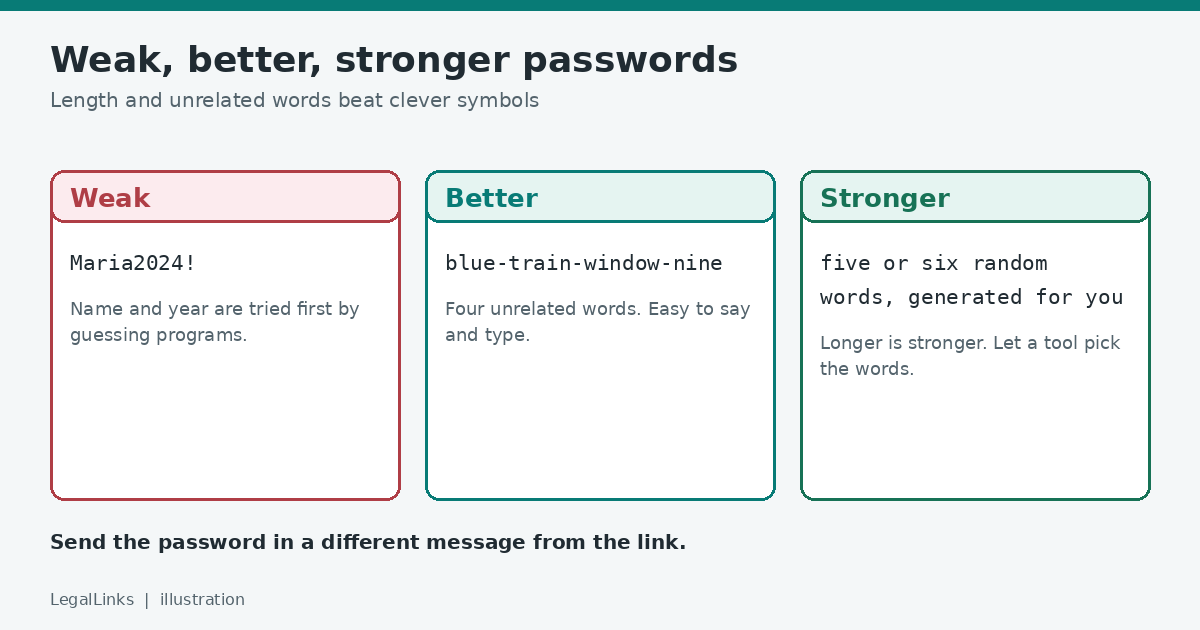
- Weak: Maria2024! It uses a name and a year, which guessing programs try first, and the exclamation mark at the end is a very common habit.
- Better: blue-train-window-nine Four unrelated words, easy to read aloud, and not connected to anything about you.
- Stronger still: A longer phrase of five or six random words, ideally generated rather than chosen by you, because people are not good at being random.
Make it easy to say and to type
A password you send to other people must work on a phone keyboard and over a voice call. Avoid look-alike characters such as the number 0 and the letter O, or a lowercase l and a capital I. Words separated by hyphens are easy to type and hard to misread. Tell people whether capital letters matter so that they do not lock themselves out by guessing.
Use a password manager for the ones you keep
If you create many protected links, you will not remember every password and you should not write them on a sticky note. A reputable password manager can generate a long random phrase and store it for you, so you can paste it into a message when you need to. Protect the manager itself with a long master passphrase and two-step verification.
What to do when someone says they cannot get in
- Ask them to copy and paste the password instead of typing it, since a stray space or capital letter is the most common problem.
- Check that you sent the password for this link, not for an older one.
- If it still fails, create a new protected link with a new password and delete the old one. This also closes any access you may have granted by accident.
When a password is the wrong tool
A single shared password is the same for every person, so you cannot tell who passed it on. If you need to know exactly who accessed something, or to remove one person without affecting the others, use a sharing system that gives each person their own sign-in. A protected link with a password is best for small, low-risk groups where convenience matters.
How often should you change it?
There is no need to change a link password on a fixed timetable. Change it when something specific happens: a member leaves the group, the password was sent to the wrong person, or you notice more visits than you expect. For long-running links that many people use, it can still be sensible to replace the link once a term or once a year, simply to close doors that nobody needs any more. Keep a note of the date you created each link and the date you plan to review it.
A password is not a vault
Remember that a password on a link is a convenience barrier. It will not protect highly sensitive information such as identity documents or financial records. For those, use the encryption and sharing controls of a trusted storage service in addition.
Short checklist
- Four or more unrelated words.
- Not used anywhere else.
- Sent separately from the link.
- Replaced when the group changes.