
A web address can contain more than a page name. Look at a link copied from a shop, a social network or an email and you will often see a long tail of letters and numbers after a question mark. That tail is called the query string, and parts of it can reveal things you did not intend to share.
What tracking parameters are
Marketers add short labels to addresses so they can see which campaign brought a visitor. Common ones start with utm_, such as utm_source or utm_campaign. Other parameters carry click identifiers from advertising platforms. They are not harmful by themselves, but they show how you reached the page.
When a link can identify you
- Links from an email newsletter may include a code unique to your subscription.
- Links copied while signed in may carry a session or user identifier.
- Share buttons can add the name of the app or the account that sent the link.
If you paste such a link in a public group, other people may be able to connect it to you, or in rare cases use the code to see your own page.
How to clean a link before sharing
- Copy the address and look for a question mark.
- Delete everything from the question mark to the end.
- Open the shortened version. If the page still loads correctly, share that one.
- If the page breaks, undo the change, because some pages need their parameters.
Be careful with documents and files
Links to shared documents sometimes have broad permissions, such as “anyone with the link can edit”. Check the sharing setting before you send the address. A link that anyone can edit is a very different thing from one that anyone can only view.
What a link service can see
Any service that sends visitors through its pages can technically see basic connection details, such as an IP address and browser type. Good services keep this to a minimum. For example, LegalLinks stores visitor IP addresses only as salted one-way hashes and explains this openly in the Privacy Policy. Always read how a service treats data before using it.
Everyday privacy habits
- Use a private window when testing links you will share.
- Keep your browser and apps updated.
- Review which apps and extensions can read the pages you visit.
- Use protected links with passwords for content meant for a limited audience.
A step-by-step example of cleaning a link
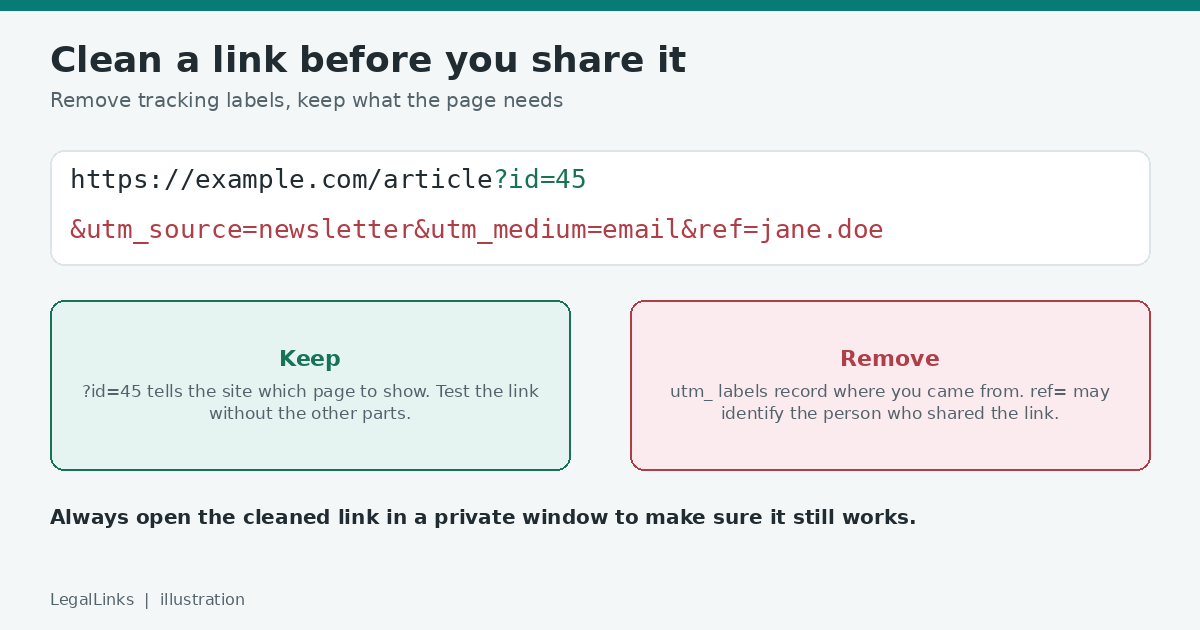
Look at an address like this one, made up for illustration: https://example.com/article?id=45&utm_source=newsletter&utm_medium=email&ref=jane.doe. The part you need is https://example.com/article?id=45. The pieces beginning with utm_ are marketing labels that tell the site where the visitor came from. The ref=jane.doe part may identify the person who shared the link. To clean it, remove everything after the parameters you need, open the shortened version in a private window, and check that it still shows the same page. If it does, share the clean version.
Be careful with previews and screenshots
Chat apps often show a preview of a link, including its title and a picture, and a screenshot of a page can include the address bar. Before you post a screenshot, crop out the address and any account names. Before you paste a link into a public chat, think about whether the preview itself reveals something private, such as a document title or a customer name.
Private links are still copies of an address
A link that says it is “unlisted” or “anyone with the link” is not a secret. It is a public address that is simply not advertised. Anyone who receives it can pass it on, and some tools record it in logs or browser history. For material that really is private, add a password, limit the audience, and set a reminder to remove access later.
Quick privacy checklist
- Does the address contain a name, email, ID or session code?
- Does it still work after removing the tracking parts?
- Would the preview or title give away anything private?
- Is a password needed, and will you send it separately?
- Do you know when you will delete the link?
Browsers and extensions can help
Some browsers now remove common tracking parameters when you copy a link, and privacy extensions can do the same automatically. Check what your own browser does by copying a link from a marketing email and looking at the result. If it is still full of labels, clean it by hand or use a tool you trust. Remember that these tools cannot remove a name or an account ID that the website itself placed in the address, so a quick manual look is still worthwhile before you share anything widely.
The takeaway
Links are small, but they travel far. Spending ten seconds to trim and check a link protects both your privacy and the privacy of the people who receive it.