
A large part of internet traffic is not people at all. It is software that visits pages automatically. Some of these programs are helpful, like search engine crawlers. Others are scrapers that collect links, email addresses or files, usually to copy or resell them. Understanding how they work helps you share more carefully.
How scrapers discover links
- Reading public pages. A scraper downloads a page and extracts every address in it. Forums, comment sections and public chat channels are favourite targets.
- Following links. Each address it finds leads to more pages, so one exposed link can spread quickly.
- Watching feeds. Some tools monitor new posts and copy links the moment they appear.
Why it matters to you
If you share a private download or a members-only page publicly, scrapers can copy the address within minutes. It may then appear on sites you never chose, used by people you never invited. For a creator, this can mean lost control and extra server load.
Simple steps that help
- Do not post sensitive links in open places. The easiest protection is not to publish them where everyone can read them.
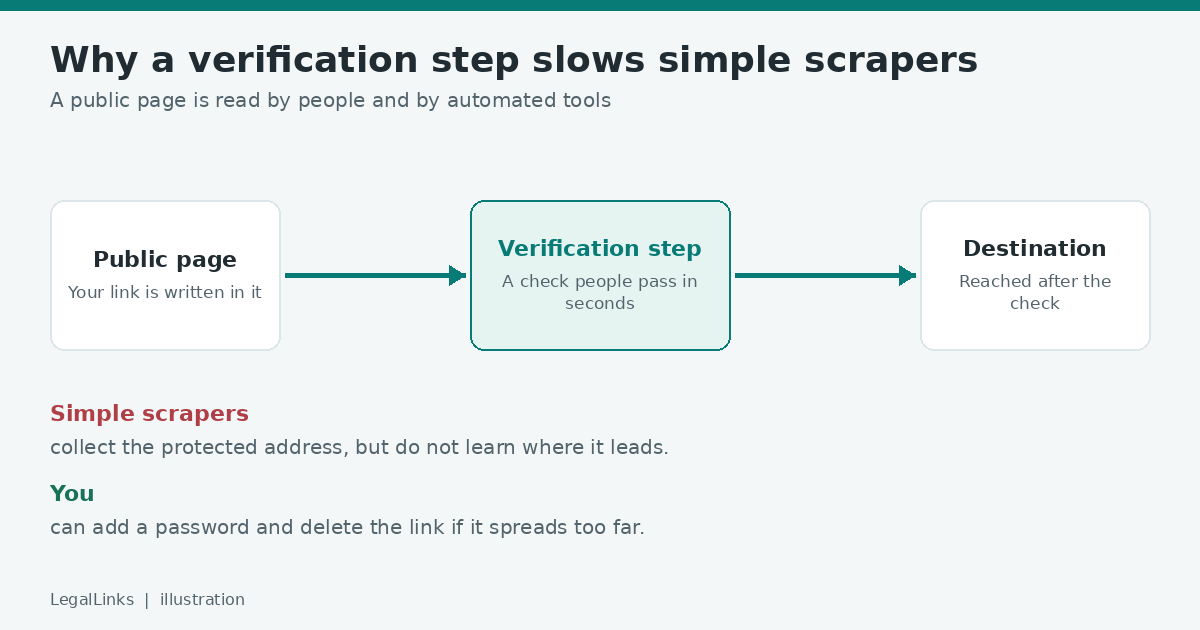
- Add a verification step. A protected link shows a short check page first. Many basic scrapers cannot pass it, so they do not reach the destination.
- Add a password. Even if a bot reaches the page, it still cannot proceed without the password.
- Use separate links for separate groups. If one link leaks, you can delete only that one.
- Review old links. Remove addresses you no longer need.
Good bots and bad bots
Not every automated visitor is bad. Search engines index public pages so people can find them, and you can control this with the rules in a file called robots.txt. Scrapers that copy private material usually ignore such rules, which is why technical barriers are more effective than polite requests.
Signs that bots are hitting a link
- A sudden spike in visits at odd hours with no matching posts or messages.
- Many visits from the same network in a short time.
- Visits that never go on to open the destination.
A dashboard that shows views per link makes these patterns easy to see.
Why a verification step helps
Many simple scrapers work by downloading a page and reading the addresses written in it. They are built to be fast and cheap, so they usually do not run the checks that a person passes without thinking. A protected link puts a step between the address and the destination. The scraper may still collect the protected address, but it does not automatically learn where the link goes. That raises the effort needed to copy your material, which is often enough to make a casual collector move on.
A short example
A small online course shares a lesson link in a newsletter. The newsletter is also posted on a public archive page. Within hours the original link appears on several link-collection websites, and the lesson is open to anyone. If the same course had used a protected link with a password, the public archive would show only the protected address. Collection sites could list it, but a visitor would still need the password to continue, and the owner could delete the link the moment it spread further than intended.
What website owners can do
If you also run a website, a few basic settings reduce unwanted collection.
- Use a robots.txt file to ask well-behaved crawlers to stay away from private areas. This is a request, not a lock, so never place secret addresses there.
- Keep private pages out of public menus and sitemaps.
- Add a “noindex” instruction to pages that should not appear in search results.
- Limit how many requests one visitor can make in a short time.
Protect the people, not only the page
Bots are not the only reason a link spreads. Real people forward, screenshot and repost. Write down who the link is for in the message itself, ask recipients not to share it, and use a password when the audience is meant to be small. Technical barriers and clear expectations work best together.
Questions people ask about bots
Are all bots bad? No. Search engines, uptime monitors and accessibility tools use bots for useful work. The problem is bots that ignore your wishes or copy material without permission.
Can I block bots completely? Not with any simple method. Determined operators can imitate real visitors. The aim is to make casual, large-scale collection harder and to notice it early.
Will a protected link hurt my real visitors? The check takes a few seconds, so most people barely notice it. Tell your audience what to expect and the experience stays smooth.
What should I do if a link spreads beyond my group? Delete it, create a new protected link with a new password, and send the new details only to the people who should have them.
Be realistic
No method stops determined, advanced bots, and anything a human can open can in theory be copied by a human. The aim is to raise the effort needed, so most automated copying fails and your content stays with the audience you chose.
If you want to learn how other options compare, read link shorteners vs protected links.