
People often mix up link shorteners and protected links because both give you a new, shorter address. Their purposes are quite different, and choosing the right one saves trouble later.
What a link shortener does
A shortener takes a very long address and replaces it with a short one that redirects to the original. It is useful when space is limited, for example in a printed flyer, a social media bio or a text message. A basic shortener does not check who is clicking and does not add any barrier.
What a protected link does
A protected link also gives you a new address, but when someone opens it, they first meet a verification page and, if you added one, a password prompt. Only then are they sent to the destination. The goal is control over access, not shortness.
Side-by-side comparison
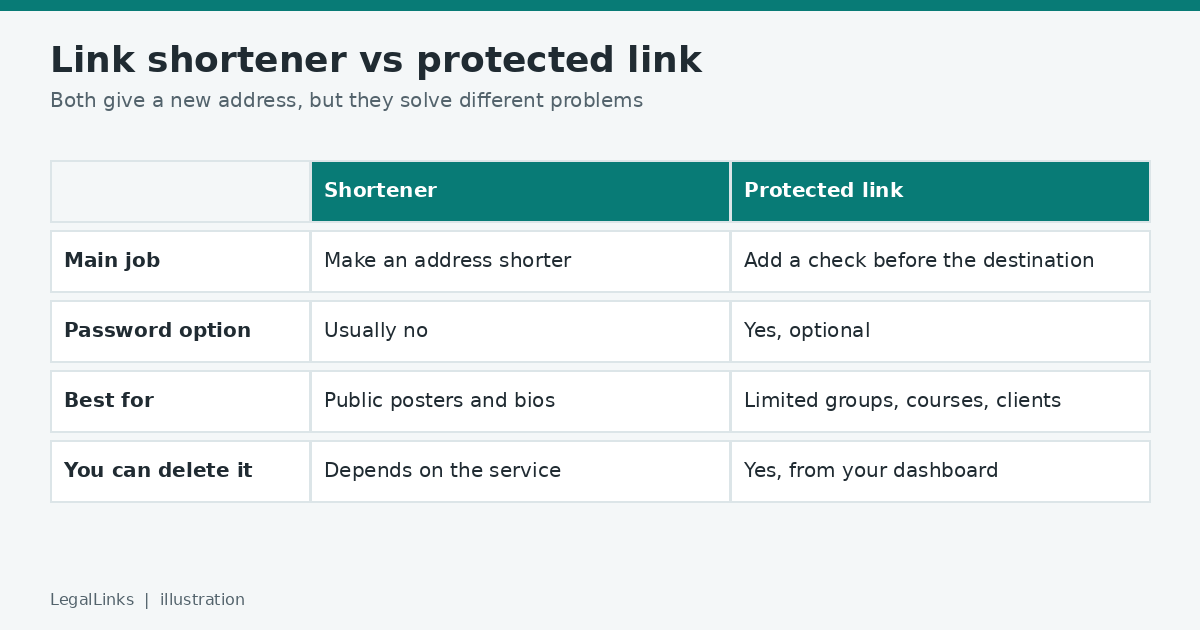
- Main purpose: a shortener saves space; a protected link adds a check.
- Password option: usually not available in a plain shortener; available in a protected link.
- Bot filtering: a shortener normally passes everyone through; a protected link can stop simple automated visitors.
- Visibility of the destination: in both cases the final address is revealed to people who complete the steps, so neither makes a public page private.
- Removal: deleting the protected address ends access through it.
When a shortener is enough
Choose a shortener when the content is public and you only want a tidy address. Examples include a link to your public portfolio, an event page or a store listing.
When you want a protected link
- You share study material or documents with a limited group.
- You post in communities where bots collect links.
- You want to know how many people opened each link.
- You want to be able to switch access off later.
Safety concerns about shortened links
Because a short address hides the destination, scammers like to use them. As a reader, treat any short link from an unknown sender with caution and read our guide to spotting phishing links. As a creator, be transparent: say what the link leads to.
Can you combine them?
Yes. A protected link is already short, so you do not need a second shortener on top. Adding another layer only makes the chain longer and harder to troubleshoot.
Think about how long the link must live
A short link is only as lasting as the service behind it. If the provider changes its rules or closes, every short link it created can stop working, and printed material or old documents are left with dead addresses. This problem is often called link rot. Before you print a link on a flyer or put it in a book, choose a service you trust and keep a record of where each short address leads, so you can repair it if needed.
Think about who clicks
A shortener treats every click the same way. That is fine for a public announcement, where the more people who click the better. It is not ideal when the audience is limited, because the short address can be forwarded as freely as the long one. A protected link adds a small step that discourages automated visits and lets you attach a password when only some people should continue.
A simple decision guide
- Public poster, bio or announcement: A shortener or the plain address is enough.
- Course material, client files, members-only resources: Choose a protected link with a password.
- A long address full of tracking codes: Clean it first, then decide. Our guide on what your links reveal explains how.
- A link you may need to cancel later: Choose a service where you can delete the link yourself.
Questions to ask any link service
- Can I see and delete all the links I created?
- What happens to my links if I close my account?
- Does the service block harmful destinations and respond to abuse reports?
- What information about visitors does it store, and for how long? Read the privacy policy to find out.
Real situations and the right choice
A café wants a short address on its menu. A shortener or a simple address on the café’s own website is enough, because the page is meant to be public.
A coach shares session recordings with paying clients. A protected link with a password fits, since only clients should watch and the coach wants to close access when the contract ends.
A community admin posts resources in a large public group. A protected link adds a check against automated copying, but if the material must remain strictly private, the admin should also use sign-in controls at the place where the files are stored.
A student shares a presentation with classmates. A plain link is usually fine, as long as the slides contain no personal information.
The bottom line
Use a shortener when you want convenience. Use a protected link when you want a bit of control. If you are not sure which you need, try protecting one link and see whether the verification step fits how you share.